
Adobe InDesign CC brings order to complex publications
Adobe InDesign CC, now commonly known as Adobe InDesign, is a desktop publishing application built for designing print and digital multi-page documents. It combines precise typography, structured layouts, interactive PDFs, and EPUB creation with production tools such as preflight checks and asset packaging. Integration with other Creative Cloud applications also supports workflows involving magazines, books, reports, brochures, and other publications that combine extensive text with graphics.
Top Recommended Alternative

Long documents are where InDesign settles in
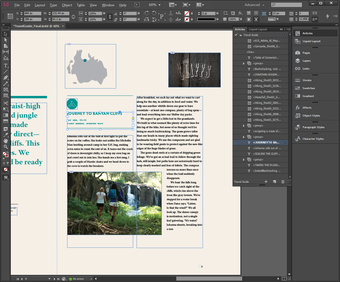
Multi-page layout sits at the center of InDesign, with tools designed to keep lengthy publications visually consistent. Parent Pages, paragraph and character styles, object styles, automatic page numbering, and linked text frames help manage recurring elements across large documents. Rather than focusing on editing individual images or illustrations, InDesign brings text and imported graphics together inside structured layouts intended for print and digital distribution.
Print, EPUB, and PDF all have a route out
InDesign supports several publishing formats, including print-ready PDFs, interactive PDFs, EPUB files, and browser-based output through Publish Online. Fixed-layout EPUBs can retain supported interactive elements, while reflowable EPUBs adapt more readily to different reading environments. IDML provides a route for exchanging documents with older InDesign releases, while Adobe Fonts integration and packaging tools help organize typefaces, linked graphics, and other assets for production handoff.
Professional control comes with homework
InDesign offers detailed typography controls for kerning, tracking, leading, OpenType features, and style-based formatting, giving experienced designers considerable control over publication design. Templates provide a more approachable starting point, while preflight tools flag issues such as missing links and overset text before output. That depth also creates a substantial learning curve, and continued access requires a Creative Cloud subscription, adding another commitment for users who only need occasional layout work.
Built for publications that need discipline
InDesign suits designers, publishers, and editorial teams that need reliable control over typography, recurring layouts, and production-ready output. Parent Pages and styles reduce repetitive formatting work, while preflight and packaging help catch problems before files move into final production. The trade-offs are its considerable learning curve and subscription-based access, making the software most worthwhile for users whose projects regularly demand the depth of a professional page layout tool.